Music you like, mixed for you
Pick the mood and how long the party runs. AutomixDJ plays free music from independent artists, blends each track into the next, and the lights follow every beat.
- Works in Chrome or Edge
- Any TV or projector
- YouTube, Spotify or the room
A full light show that follows the music, not a screensaver
Lasers on the beat
Beams lock to the kick drum, sheets fill the breakdown and the drop brings the full web, strobes and colour. It follows 80 to 180 beats a minute, live.
Everyone sings along
The show names the song from the sound and puts its words on the wall in time, like karaoke with your own playlist.
Your name in lights
Put a DJ name or a birthday message in lights, or your logo on the stage with its own height, size and brightness.
Runs itself all night
Auto mode and Auto Jockey pick the looks, colours and drops song by song, so the host gets to dance. Take over any time from the keyboard.
Made for DJs
Two decks in the browser with Auto-mix, a DJ cockpit on the phone and a weekly scoreboard of the best sets.
No gear, no beams in anyone's eyes
Nothing to buy, rig or hire, and no real lasers. One slider turns the strobe to 0 for guests sensitive to flashing light.
Two DJ tools, built into the show
Mix your own tracks in the browser, and read the room from your phone while you play.
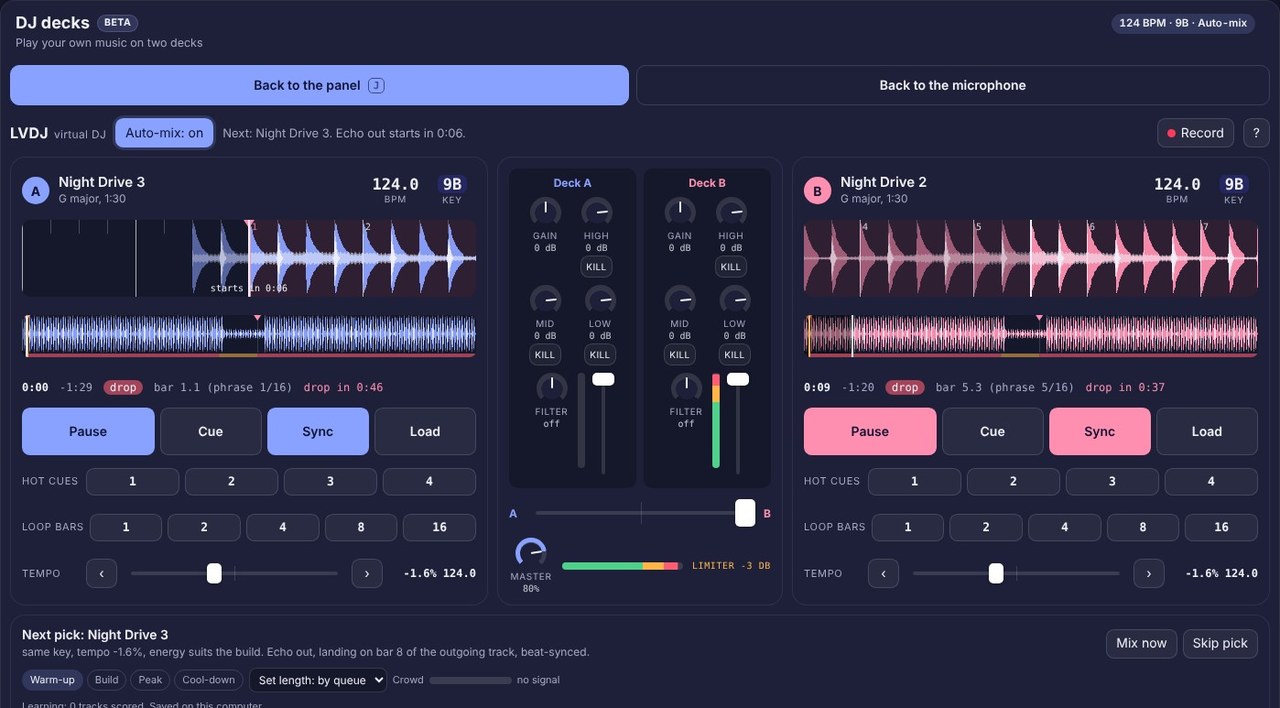
LaserVisualizer DJ Decks
Two decks for your own MP3s, right in the browser. Turn on Auto-mix and it picks the next track in a matching key and tempo, mixes on the phrase and lets the lights hit every drop.
Learn more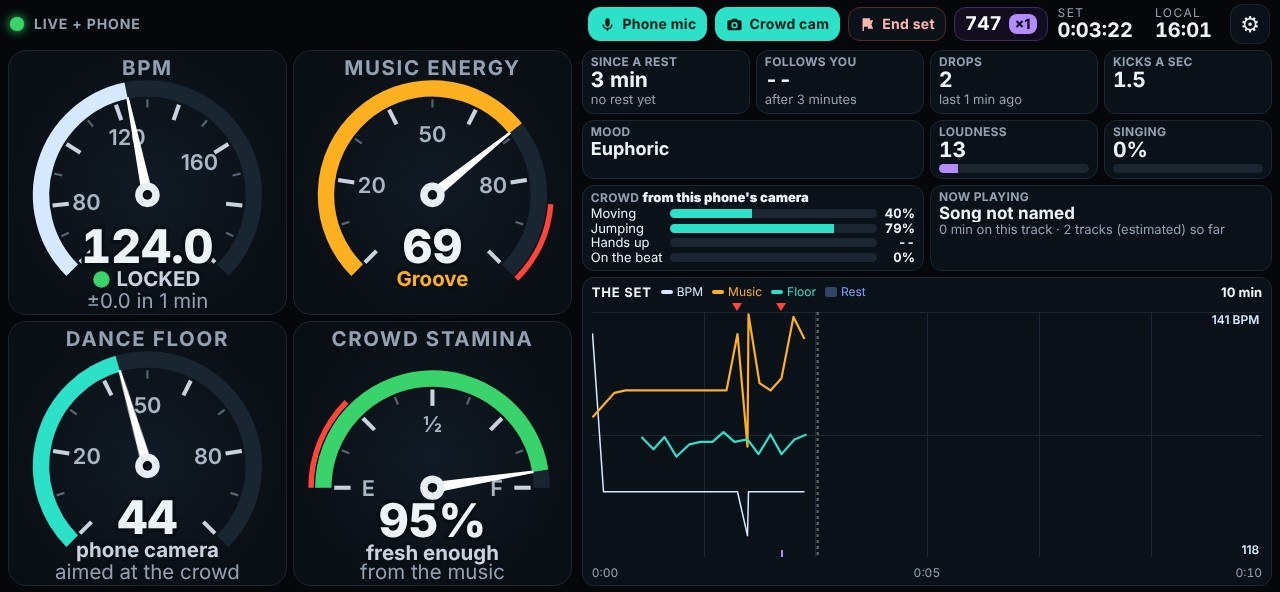
LaserVisualizer DJ Cockpit
Live gauges on your phone: the tempo, the music energy, how full the dance floor is and how much the crowd has left, with your whole set on one graph.
Learn moreParty-ready in three steps
Open the show
Go to laservisualizer.com/show in Chrome or Edge on a laptop. No account needed.
Put it on the big screen
Connect the laptop to a TV or projector by HDMI and press F for full screen.
Play your music
Share the YouTube or Spotify tab, or let the laptop's microphone hear the speakers. The show takes it from there.
From living-room parties to DJ practice
House parties and birthdays
A name in lights, a message flying across the wall and a dance floor that looks like a festival.
DJ practice
Practise your sets with visuals that react to every mix, then put your score on the DJ scoreboard.
Karaoke nights
Sing-along words on the TV for the songs you already play, timed to the singing.
Office parties and dinners
Your company name in lights on the screen or projector already in the room.
Kids' discos
Colour and movement with no real lasers, and the strobe off with one slider.
Weddings and celebrations
Your names in lasers and a message flying across the wall, all night.
Festival lights without the kit
| - | LaserVisualizer | A party laser kit |
|---|---|---|
| What you need | A laptop and a TV or projector | Lasers, stands, cables and often a haze machine |
| Cost to start | Free, 90 minutes a day | Buy or hire |
| Follows the music | Reads the beat, the parts of the song and the drop | Usually a sound-activated pattern |
| Sing-along words | Yes, for songs it recognises | No |
| Eye safety | No real lasers at all | Needs careful aiming |
Free for 90 minutes a day
Free
every day
USD 0
- 90 minutes of show a day, 180 when you sign up free
- Every look, the sing-along words and the DJ decks
- A small laservisualizer.com mark on the wall
Longer parties
passes and plans
- 48-hour pass: USD 4.99
- Monthly: USD 19.99
- Annual: USD 119.99
- No mark on the wall
Paid by card through Paddle, our reseller.
Questions people ask
Is LaserVisualizer really free?
Yes. The show, the sing-along words and the DJ decks are free for 90 minutes of show a day, with no account and no download. Passes give unlimited time for longer parties.
What do I need?
A laptop with Chrome or Edge and a TV or projector, connected by HDMI. A projector on a wall in a dark room looks most like a real rig.
Where does the music come from?
Anything you already play: share a YouTube or Spotify tab, use the sound of the whole computer on Windows and Chromebooks, or let the microphone hear a DJ or a speaker in the room.
Does it record my party?
No. The sound is analysed in the browser and never recorded or sent. If the camera is on, pictures stay on the laptop.
Is it safe for people sensitive to flashing light?
The show uses strobe flashes by default. Set Strobe to 0 in the controls and the flashes stop while the colours and movement carry on.
Which browsers does it work in?
Chrome or Edge on a laptop or desktop, on Windows, macOS, ChromeOS or Linux. A laptop connected to a TV or projector is the intended setup.
Your next party starts in under a minute
Open the show, plug in the screen and press play.
Start the free show No sign-up, no download.